 BlockMap
Web Swing: a free Spider-Man style web swinging addon for Minecraft Bedrock
Tap at a building, swing on the web and fly where you look. Web Swing is our free addon for Minecraft Bedrock on phones, tablets and Windows: web swinging, a web zip, an air boost and wall runs, in one .mcaddon file. Below: the download, the install, every move and how it works.
Web Swing 1.0.2 in the BlockMap app's Times Square world, filmed in Minecraft Bedrock 26.65 with the game's own graphics.
In one minute
Web Swing adds two items to Minecraft Bedrock. The Web Launcher: tap at a building and a web sticks to it; you swing and fly where you look, tap again for the next web, press Jump to fling on. The Web Zip: tap at a block and it pulls you there. You need:
- Minecraft Bedrock 26.10 or newer on Android, iPhone, iPad or Windows.
- The .mcaddon file from this page: tap it and Minecraft imports it.
- A world with the behaviour pack on: Behavior Packs, Web Swing, Activate. No experimental features.
Then take the items from the Creative inventory (search "web") or craft them, and find something tall.
What it looks like in the game
The same run down 7th Avenue south of Times Square three ways: behind the player, in first person and from a camera set down beside the avenue. With tall buildings on both sides the webs go left, right, left, right, and the swing stays high above the traffic. Every move in these clips is the addon's own, in Minecraft Bedrock 26.65 with no shaders and the interface hidden.
Measured from the game's own record of the run: 5 webs carried the player 306 blocks down the avenue in 10.5 seconds. At one block per metre, the top speed is about 130 km/h.
Every move
Each move is one tap or one button. They chain: a web, a jump off it, a boost in the air, the next web, a wall to run up.
| Move | How | What happens |
|---|---|---|
| Web swing | Tap at a building with the Web Launcher | The web sticks to the block you aim at, up to 120 blocks away (at the sky: the best wall ahead). You fly where you look. |
| Next web | Tap again, in the air | The old web goes, the new one sticks at once and your speed carries over. |
| Fling | Jump | You leave the web with a push along your view, the stronger the faster you were. |
| Let go | Sneak, or the back key | The web goes; you keep your speed and fall. |
| Air boost | Sneak, then tap, in the air | A dash along your view. Two per jump. |
| Wall run | Tap facing a wall up close | A push up the wall. Tap again to keep climbing. |
| Web Zip | Tap at a block with the Web Zip | Pulls you there, up to 72 blocks. |
| Point launch | Sneak during a zip, then land | A big jump forward from the spot you zipped to. |
| Hang | Switch items while swinging | You hang upside down under the web. Back to the launcher: you drop. |
Download

| File | Size | SHA-256 | |
|---|---|---|---|
| The addon | web-swing-1.0.2.mcaddon | 23 KB | 4316c19b72eeaa37… |
| Source code | web-swing-1.0.2-bedrock-source.zip | 25 KB | 4e09152e422b6f52… |
What is in the file
- Web Swing (behaviour pack): the two items, their recipes, the web line and one script on the game's stable Script API.
- Web Swing Resources (resource pack): the item pictures, the web's model and the poses: hanging from the web, a dash, a climb, upside down.
A .mcaddon is a zip of those two packs; Minecraft imports both with one tap. Nothing in it is from another addon.
Install on a phone, tablet or PC
The same file works on every device that runs Minecraft Bedrock 26.10 or newer. It takes about two minutes.
- Download the .mcaddon with the button above, on the device you play on.
- Open it. On Android, tap the download (or find it in Files, Downloads) and choose Minecraft. On iPhone and iPad, Safari saves it to the Files app: open Files, tap the file, and if it doesn't start Minecraft, use Share and pick Minecraft. On Windows, double-click the file. Minecraft starts and says Successfully imported once for each pack: "Web Swing" and "Web Swing Resources".
- Turn it on in a world. Create a new world (or edit one with the pencil), open Behavior Packs, find Web Swing under Available and tap Activate. The game adds Web Swing Resources by itself. No experimental features are needed.
- Take the items. In Creative, open the inventory and search . With cheats on you can also type and . In Survival, craft them.
- Swing. Look at a tall building and tap.
To update later, delete the old Web Swing packs (Settings, Storage) and open the new file.
Controls
| Phone and tablet | Windows | |
|---|---|---|
| Shoot a web, next web | Tap the screen | Right mouse button |
| Steer, climb, dive | Drag to look | Mouse |
| Fling | Jump button | Space |
| Let go | Sneak button, or back | Shift or S |
| Air boost | Sneak, then tap | Shift + Right mouse button |
| Wall run | Tap facing a wall | Right mouse button facing a wall |
| Point launch | Sneak during a zip, land | Shift during a zip, land |
| Watch yourself | Settings, Camera perspective | F5 |


Tips
- Look a little up. You fly where you look, with a small lift. Level is a slow climb, a little up climbs fast, down dives.
- Tap again before you sink. Each web starts with a short dive, so the next web is best fired while you still have height. Close to the street the dive is skipped and the web lifts you.
- Aim at the sky in a wide street. With nothing under the crosshair, the launcher finds the best wall ahead and above, on the other side of the street from your last web.
- Stop any time. A web lets go by itself at the top of its swing, after three seconds, when you land or when you press back. Sneak lets go at once.
- Fell to the street? Tap a building: a web from the ground lifts you straight away. You take no fall damage while you hold an item, or for five seconds after a move.
Crafting the items in Survival
Both items are made at a crafting table. They unlock in the recipe book when you pick up string.

A real city to swing through
A web needs a wall to stick to, high and close. In a plains world there is nothing to hold; a real downtown, with streets between tall towers, is made for it. Every clip on this page was filmed in Times Square worlds made by our app's engine: BlockMap turns a place you search into a Minecraft world, Bedrock or Java, on your phone. The swings come from a bigger 2 x 2 km world we made with the same engine, so the city goes on past the edge of the picture; in the app each search builds the square kilometre around it.
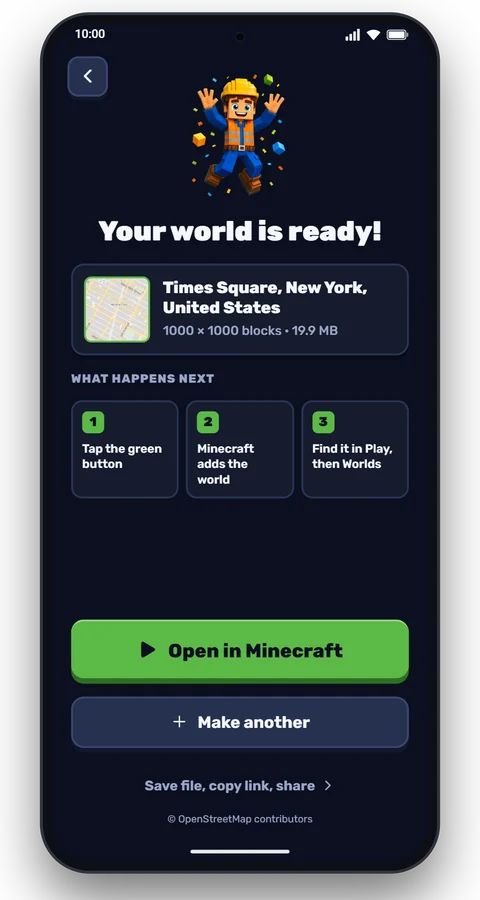
- Search the place in the app. For the world in our clips, search . The square on the map is the square kilometre your world will cover.
- Tap Create my world. A Times Square world is ready in under a minute.
- Open it in Minecraft from the app. Then edit the world, turn on Web Swing under Behavior Packs, and play.
Building worlds in the app is free (a world every 8 hours), or Pro removes the wait. Places with tall towers close together work best: Midtown Manhattan, Chicago's Loop, Central in Hong Kong, Dubai Marina, Shinjuku in Tokyo. For a city made for stunts, search : the whole of South Beach, with a giant ramp out over the sea.
How it works
Minecraft has no ropes, so the addon moves you itself, 20 times a second, with the game's own knockback: the push the game gives a player who is hit. The swing works like the most played web swinging addons on Bedrock, with a few changes of ours.
- Momentum. A counter from 0 to 12 grows by one every two ticks you spend in the air and falls by one every eight ticks on the ground. Every web pushes from 6 up, so even a web fired from the street moves you at once.
- The dive. For half a second after a web sticks, you are pushed forward and down: the drop that makes a swing look like a swing. A web fired from another web dips for a fifth of a second only.
- Off the street. The addon checks how far the ground is below you every tick. The dive fades out from 24 blocks above the ground and stops at 12, and below 12 blocks each push lifts you, so a swing never runs along the street. Look down more than 30 degrees and the lift stops, to land.
- The push. Then each tick pushes you along your view: 1.7 times stronger at 6 and up to 2.86 times at 12, plus a small lift. That is why you fly where you look and climb when you look up.
- The pull. At full momentum the web also pulls you toward its wall, sideways only, and slow falling keeps you from dropping between pushes.
- One web, one swing. A web lets go by itself, keeping your speed, at the top of its swing or after three seconds, when you land, or when you press back. It also snaps if you get 20 blocks farther away than you were when you fired it.
- The fling. Jump leaves the web with a push of 4 along your view, growing to 5.76 at full momentum.
- Aiming at the sky. With nothing under the crosshair, the launcher casts 78 rays up and ahead (up to 60 degrees either side) and picks the wall that is most ahead, high enough and about 45 blocks away, with a strong pull to the other side of the street from your last web, so a street with tall buildings on both sides gets webs left, right, left, right. The web leaves from the hand on its side. High above the roofs it also looks below you.
| Value | Note | |
|---|---|---|
| Web range | 120 blocks | The Web Zip: 72 |
| Longest web | 3 s | Or until the top of its swing |
| Air boosts per jump | 2 | The first strong, the second along your view |
| Wall run | a push up per tap | One tap every half a second |
| Point launch | the biggest push | Forward, with a lift |
| Hang | up to 30 s | The web climbs to 16 blocks below its wall |
| Ground clearance | 12 blocks | The dive fades out from 24 blocks up; a lift below 12 |
| No fall damage | 5 s | After any move, and while you hold an item |
The web line is a thin model the addon stretches from the spot it hit to your hand every tick. Lines are removed when a web ends, and any left over in a world (a game closed mid-swing, a phone that killed the app) are cleared the next time they load.
If something doesn't work
| What you see | What to do |
|---|---|
| Tapping the file doesn't open Minecraft | Open it from your Files app, or use Share and pick Minecraft. On Windows, check that the file name still ends in .mcaddon (some browsers add .zip). |
| "Import failed" or "Duplicate pack" | An older Web Swing is installed. Delete it in Settings, Storage, then open the new file. |
| The items aren't in the inventory | The behaviour pack isn't on in this world: edit the world, Behavior Packs, Web Swing, Activate. |
| The items are there, but tapping does nothing | Your Minecraft is older than 26.10: update it. Or nothing is in reach: aim at a building within 120 blocks. |
| The items show as missing textures | The resource pack is off: Resource Packs, Web Swing Resources, Activate. |
| /give says you don't have permission | Cheats are off. Turn on Activate Cheats in the world settings, or craft the items. |
| The swing stutters | On a server or a Realm the network delay shows. In a single-player world it is smooth. |
Something else? Write to contact@nikandrsoftware.com with your device, your Minecraft version and what you did.
Questions
Is this a Spider-Man addon?
No. Web Swing is our own web swinging addon: you swing between buildings the way Spider-Man does in the films and games, but there is no character, suit, mask, logo or story from Marvel in it, and you keep your own skin. Spider-Man is a trademark of Marvel. Web Swing and BlockMap are not affiliated with or endorsed by Marvel, Sony or Disney.
How do you swing like Spider-Man in Minecraft Bedrock?
Install this addon, take the Web Launcher and tap at a tall building. The web sticks, you swing and you fly in the direction you look: look up to climb, down to dive. Tap again for the next web while you are still in the air, and press Jump to fling yourself forward. A street with tall buildings on both sides works best: aim at the sky and the launcher puts each web on the other side, left, right, left, right.
Can you get mods on Minecraft PE?
Yes, as addons. Minecraft on phones and tablets (once called Pocket Edition, MCPE) is the Bedrock Edition, and it opens addon files (.mcaddon and .mcpack) directly: tap the file and Minecraft imports it. Java mods (.jar) don't work on Bedrock.
Does it work on iPhone, iPad and Android?
Yes, the addon is the same file for every device that runs Minecraft Bedrock 26.10 or newer, and it uses no experimental features. We tested it on Windows 11 (Minecraft 26.65); on a phone the controls are the touch buttons described above.
Does it work on Xbox, PlayStation or Switch?
Consoles can't import addon files from the internet. You can play it there only on a world that already has it, such as a Realm set up from a phone or a PC.
Which Minecraft version do I need?
Minecraft Bedrock 26.10 or newer: the addon uses the game's scripting version that arrived in 26.10. On older versions (1.21 and 26.0) the items appear but nothing moves: update Minecraft.
Do I need to turn on experimental features?
No. Web Swing uses only the game's stable scripting, so you just activate the behaviour pack. Like every behaviour pack, it turns off achievements for that world.
Is Web Swing free and safe?
Yes. It is free, with no ads and no account. The .mcaddon holds only JSON files, images and one script, with the source on this page, and a Bedrock addon can't reach the internet or your files. Check that your file's SHA-256 matches the download table and download it only from this page.
Can I use it in Survival?
Yes. Craft the Web Launcher from three string, an iron ingot and redstone, and the Web Zip from three string, an iron ingot and a tripwire hook. You take no fall damage while you hold either item, or for five seconds after a move.
Is there a grappling hook?
Yes, the Web Zip. Tap it at a block up to 72 blocks away and it pulls you there. Hold or press Sneak on the way and land on the spot for a point launch, a big jump forward.
Does it work in multiplayer and on Realms?
It works in multiplayer: every player gets their own webs. We built it for single player; on a server or a Realm the network delay can make the swing less smooth.
Does it work with other addons and skins?
Yes. Web Swing adds two items and changes no vanilla files, so it works next to other addons, and any skin works, including a Spider-Man one you have.
Can I use it in my videos?
Yes. The MIT license lets you use, share and change it, also in videos, streams and your own packs. A link to this page is appreciated.
Is there a Java version?
Yes: Web Swing for Minecraft Java, a Fabric mod with a real pendulum swing.
Versions and credits
| Version | Date | Minecraft | Changes |
|---|---|---|---|
| 1.0.2 | 21 November 2026 | Bedrock 26.10+ | The swing keeps off the street: no dive near the ground and a lift within 12 blocks of it (looking down still lands you). Water counts as ground, so a flooded street is no trap. |
| 1.0.1 | 21 November 2026 | Bedrock 26.10+ | Webs the launcher picks for you alternate left and right across a street (a strong pull to the other side, a wider fan of rays); the web leaves the hand on its side, with mirrored poses for the left arm. |
| 1.0.0 | 20 November 2026 | Bedrock 26.10+ | First public release: the Web Launcher (swing, next web, fling, air boost, wall run, hang) and the Web Zip (zip, point launch), recipes, poses. |
Web Swing is © 2026 Nikandr Software Limited, under the MIT license. Not an official Minecraft product; not approved by or associated with Mojang or Microsoft. Spider-Man is a trademark of Marvel; Web Swing and BlockMap are not affiliated with or endorsed by Marvel, Sony or Disney. Map data © OpenStreetMap contributors.
More articles
 Character
 Mod
 Guide
 Guide
 How it works
Make your own place in Minecraft
Search any street, school or city. About a minute later it's a world, free to use.