 BlockMap
How to use Arnis on your phone
Arnis, the open-source project that turns OpenStreetMap into Minecraft worlds, runs on Windows, macOS and Linux. There is no Arnis app for phones. You can still play its worlds on Android and iPhone: build one on a computer and copy it over, pay for MapSmith in a phone's browser, or use BlockMap, an app that runs the Arnis engine on our servers. Below, all three side by side, and Times Square built from a phone, screens and all.
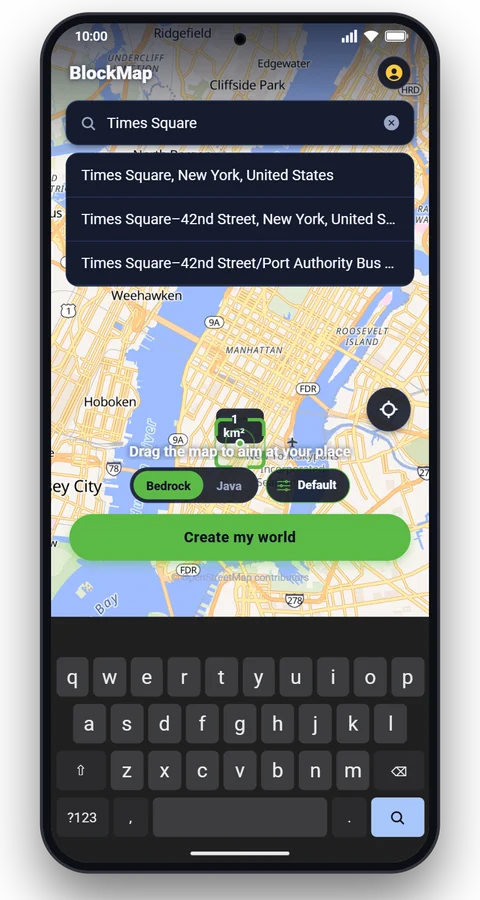
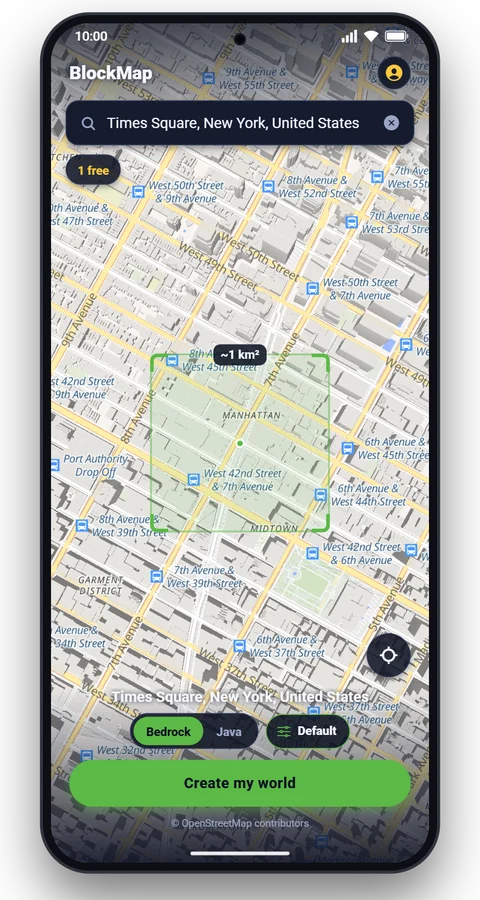
Left: the BlockMap app, searching and building the world. Right: the street map of that square kilometre, then the world itself in Minecraft: the flight down the square from the red steps to One Times Square. Building Times Square in the app took 68 seconds on 3 November 2026.
Short answer
There is no Arnis app for Android or iPhone. The Arnis project releases its program for Windows, macOS and Linux, and Minecraft on phones can only open Bedrock worlds. So you either build the world somewhere else and bring it to the phone, or let a server build it for you:
- Arnis on a computer, then copy the Bedrock world to your phone: free, any size.
- MapSmith, the Arnis author's paid website: works in a phone's browser, priced per world.
- BlockMap, a phone app built on the Arnis engine: search a place, and the world opens in Minecraft on the same phone.
The three ways, side by side
| Arnis on a computer | MapSmith | BlockMap app | |
|---|---|---|---|
| Runs on | Windows, macOS or Linux | A web browser, on a phone too | Android, iPhone and iPad |
| Made by | The Arnis project, open source (Apache 2.0) | The Arnis author, as a paid service | Nikandr Software Limited, built on Arnis's open-source code |
| Price | Free | Per world, by area: €3 for a neighbourhood up to €50 for a region (its site, 3 November 2026) | First world free, then a free world every 8 hours, or Pro without the wait |
| Area | Any rectangle you draw | Presets or a drawn area | 1 × 1 km around the place you search |
| Editions | Java, Bedrock, Luanti | Java or Bedrock | Bedrock, opens in Minecraft on the phone; Java as a download link for a computer |
| Onto the phone | Copy the .mcworld file over yourself | Download link by email | Tap Open in Minecraft |
| Settings | Scale, spawn point, interiors, winter, One World and more | Game mode, time of day, spawn point, roofs, land cover, interiors | World looks: seasons, snow, desert, flood, weather, time of day, Survival |
MapSmith's prices and settings are as its own page listed them on 3 November 2026; check it for today's.
Way 1: Arnis on a computer, then copy the world to your phone
This is the free route, and the only one with no size limit beyond your computer's memory. Download Arnis only from its GitHub releases page or arnismc.com: the project warns that these are its only official websites.
- Download Arnis for Windows, macOS or Linux and start it.
- Draw a rectangle round your place on its map, choose Bedrock as the edition, and start the generation. Arnis downloads the map data and writes a .mcworld file.
- Move the file to your phone: save it to a cloud drive, send it to yourself, or copy it with a cable.
- On the phone, tap the file and open it with Minecraft. On an iPhone, find it in the Files app, tap Share and pick Minecraft. The world is added to your world list.
Choose Bedrock, not Java: Minecraft on phones is the Bedrock Edition and can't open Java worlds.
Way 2: MapSmith, in your phone's browser
The author of Arnis also runs MapSmith, a website that generates Arnis worlds for you. You draw an area or pick a preset, choose Java or Bedrock and a few settings, pay for that world, and the download link arrives by email. It needs no computer, so it works from a phone's browser; on the phone you then open the Bedrock file with Minecraft as in way 1. It suits bigger areas than one square kilometre.
Way 3: the BlockMap app
BlockMap does the computer's part on our servers. You pick the place on your phone, the server builds the world with the Arnis engine, and the finished world opens straight in Minecraft on the same phone. Here is the whole thing in the app:
- Search the place. Type a city, a street, a landmark or an address, or move the map. The square on the map is the square kilometre your world will cover.
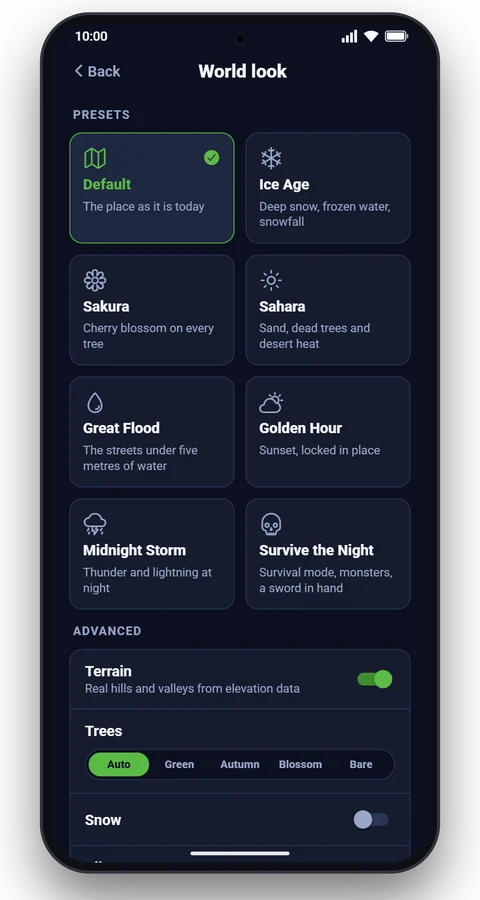
- Check the world look. Leave it on Default, or pick a look such as Golden Hour, Ice Age or Great Flood. Bedrock or Java is a switch on the main screen.
- Tap Create my world. The server builds it: in the last 30 days half of all worlds took under 6.8 seconds of building, 9 in 10 under 13.
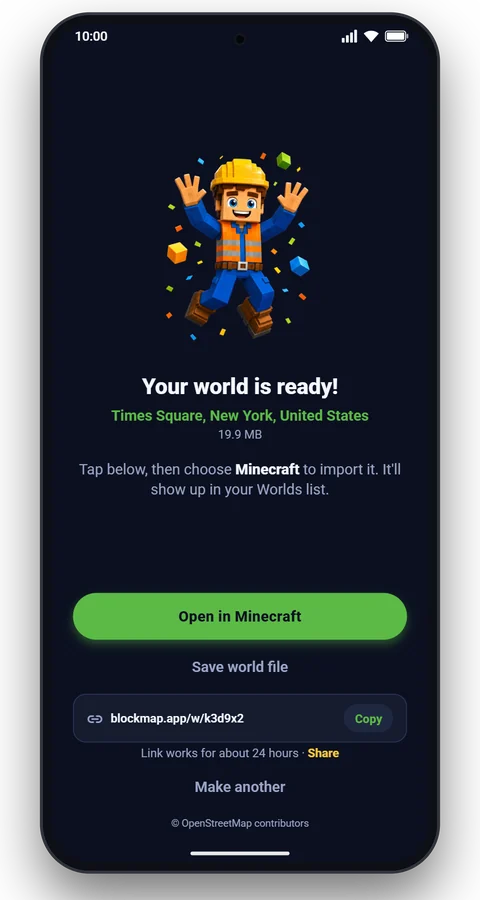
- Tap Open in Minecraft. The Bedrock world is imported into Minecraft on the phone. A Java world comes as a download link that works for about a day, to open on a computer.
Times Square, built from a phone
More BlockMap users build Times Square than any other place: in the 90 days to 3 November 2026, about 800 people made a world centred on it. The search centres the world on the square itself. Its square kilometre runs from Bryant Park and the New York Public Library to the Port Authority Bus Terminal, with 45 theatres in between, most of Broadway among them. OpenStreetMap has 872 buildings in that square, 967 building parts and 1,136 streets, paths and plazas; 88% of the buildings carry a height or a number of floors, so Midtown's towers stand at their mapped heights. The tallest, the Bank of America Tower, rises 354 blocks above the street, under Minecraft's height limit.
That is longer than most worlds take. After the engine has built Midtown, our servers place the screens, which takes about 40 seconds in a city this dense.
What Arnis builds, and what we add
Arnis builds every building, street and plaza here from OpenStreetMap. The map has no billboards, so on its own the square is grey stone and glass. The screens, the red steps over the TKTS booth, One Times Square with its news ticker, and the New Year's Eve ball on its roof are a model we made for the app. Every Times Square world gets it. The pictures on the screens are our own: sunsets, words, a skyline. No brands, no real adverts.

 Arnis aloneIn BlockMap

 Street mapMinecraft world
The holiday version
From 1 November to 10 January, by the date in New York, the app builds Times Square in its holiday version. About half of the screens switch to snow, presents, baubles and Happy New Year. The coming year stands in lit gold numerals on the roof of One Times Square, in front of the ball. A Christmas tree 24 blocks tall stands on the plaza between 45th and 46th Streets. The two flights below are from the app's own world, built on 3 November 2026 with Time of day set to Night. From 11 January, Times Square worlds go back to the year-round screens. Because the app gives the holiday version until then, we built the year-round worlds on this page on our servers by hand, with the same engine and the same model.
Same engine, our changes
BlockMap's worlds are built by Arnis 3.3.0 (released in October 2026; Arnis 3.4.0 followed on 31 October). Buildings, roads, water, terrain and the scale of one block per metre come from it. On top of it we made changes for the places people search most, and for phones:
- Fresh map data. The map is read from our own copy of OpenStreetMap, which takes in every edit within minutes.
- No false hills under trees. Where no national laser survey exists, the ground comes from a bare-earth terrain model, so a park or a grove stays level. How worlds are made shows every data source.
- Ferris wheels as wheels. Mapped big wheels are built with a rim, spokes and cabins, from the London Eye to the rusted wheel of Pripyat.
- Straight aircraft and whole towers. Aircraft at airports keep their shape, and towers mapped in many short pieces, like the Kremlin's, stand on the ground.
- Schools that read as schools. Mapped schools get a sign with the school's name, a flag and a bike rack, and a clock over the door where the front is tall enough.
- World looks. Autumn, cherry blossom or bare trees, snow and ice, desert, a flood, rain or thunder, sunset or night, and Survival with a starter kit.
- Landmarks built by hand. For famous places we build our own models: the screens of Times Square, Big Ben, the Titanic, the pyramids of Giza and more.
Here is the same moment of the flight down Times Square in four world looks, each a separate world of the same square kilometre:


What Arnis on a computer does that BlockMap doesn't: areas bigger than a square kilometre, your own scale and rectangle, Luanti worlds, the Java-only extras, and it is free without limits. If you have a computer and want a whole city, use Arnis itself.
Questions
Is there an Arnis app or APK for Android?
No. The Arnis project publishes builds for Windows, macOS and Linux only, and says that its GitHub page and arnismc.com are its only official websites. A file called an "Arnis APK" from anywhere else is not from the project. To get Arnis worlds on Android, build the world on a computer and copy it over, use MapSmith in the browser, or use an app such as BlockMap that runs the engine on a server.
Is there Arnis for iPhone or iPad?
Not from the Arnis project. On an iPhone or iPad you can open a Bedrock world (.mcworld) made by Arnis on a computer, use MapSmith in Safari, or use the BlockMap app, which also runs on iPad.
Can I play Arnis Java worlds on my phone?
No. Minecraft on Android and iPhone is the Bedrock Edition, and it can't open Java worlds. Choose Bedrock when you build a world for a phone. Java worlds are for Minecraft on a computer.
Is BlockMap made by the Arnis team?
No. BlockMap is a separate app by Nikandr Software Limited. It builds worlds with Arnis's open-source code, which the Apache 2.0 license allows, and adds its own changes. The Arnis project does not make or endorse BlockMap.
How big are BlockMap worlds?
One square kilometre around the place you search, at one block per metre. Arnis on a computer can build bigger areas, as large as the computer can handle.
How long does it take?
Half of the worlds BlockMap built in the last 30 days were ready in under 6.8 seconds of building, and 9 in 10 in under 13 seconds. A Bedrock world is about 4.9 MB at the median. Places where we add our own model take longer: Times Square takes about a minute.
Is BlockMap free?
Your first world is free. After that you get a free world every 8 hours, or Pro removes the wait.
Why does my Times Square world have a Christmas tree?
From 1 November to 10 January, BlockMap builds Times Square in its holiday version: holiday pictures on about half of the screens, the coming year on the roof of One Times Square and a Christmas tree on the plaza. A world built from 11 January to 31 October gets the year-round screens. What counts is the date in New York on the day the world is built.
Credits
Arnis is © its contributors, under the Apache License 2.0 (github.com/louis-e/arnis). Map data © OpenStreetMap contributors. The Arnis project and MapSmith do not make or endorse BlockMap.
More articles
 Guide
 How it works
Make your own place in Minecraft
Search any street, school or city. About a minute later it's a world. Your first one is free.