 BlockMap
Google Maps to Minecraft: how to turn a real place into a world
Find a place on Google Maps, and a minute later you can walk around it in Minecraft. Not by importing Google's map: its terms don't allow that. The same streets, buildings, parks and rivers are in OpenStreetMap and other open data, and that is what BlockMap builds worlds from. Here is how it works, with Central Park and Midtown New York as the example.
The square kilometre around the south end of Central Park: the street map, the Minecraft world from straight above, then the world itself. Built by the BlockMap app on 3 November 2026 in 10 seconds.
Short answer
No app can import Google Maps into Minecraft: Google's terms forbid copying its map content or using it to make another map. But you don't need Google's copy. Every street, building outline, park and river you see on Google Maps is also drawn in OpenStreetMap, the open map anyone may use. Search the same place in BlockMap and it builds that square kilometre as a Minecraft world, block by block, in about ten seconds.
From a place on Google Maps to a Minecraft world
- Find the place on Google Maps. Note its name, the street, or a landmark next to it. You only need something to search for.
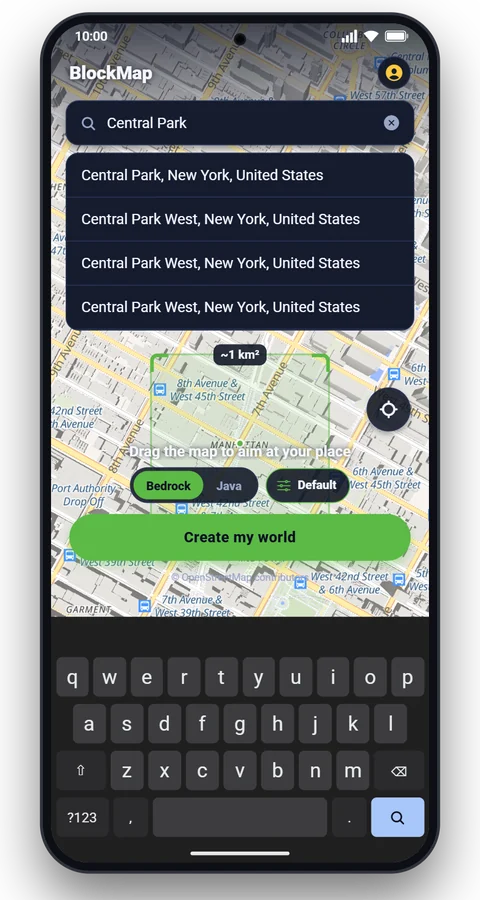
- Search it in BlockMap. Type the same name. In the example we searched : the app shows the results and flies the map there.
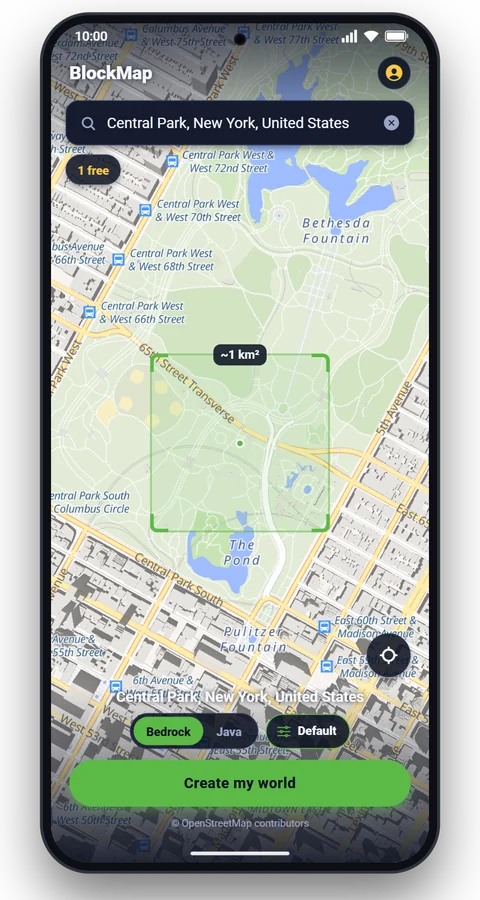
- Move the map until the square covers your spot. The square is the square kilometre the world will hold. We dragged it south so it takes in the Pond, Wollman Rink and the towers of 57th Street.
- Pick a world look if you like, then tap Create my world. The world is ready in seconds.
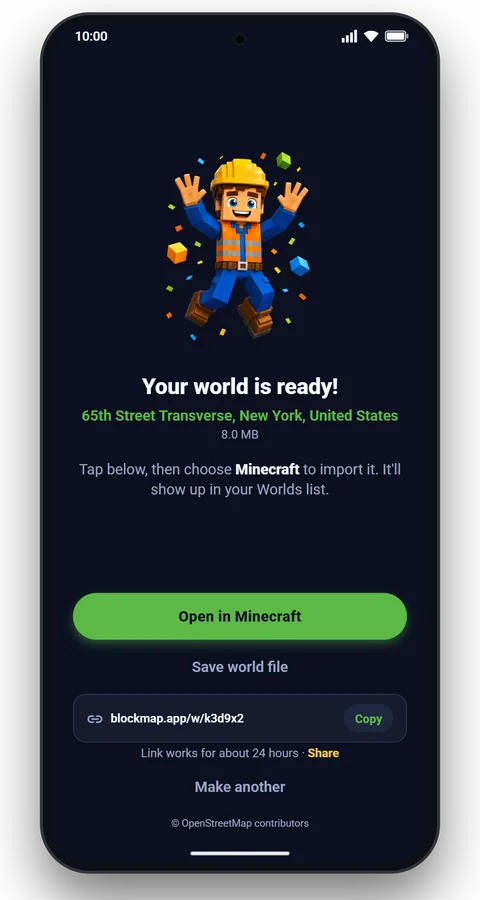
- Tap Open in Minecraft. On a phone or tablet the world opens in Minecraft (Bedrock). For Java, copy the download link and open it on your computer.
The map and the world, square for square
The world is the map's square kilometre at one block per metre, north up, so you can lay one over the other. Drag the line across each picture: on the left the street map, on the right the world built from that square, drawn from its top blocks.

 Street mapMinecraft world

 Street mapMinecraft world

 Street mapMinecraft world
Street maps: OpenFreeMap, © OpenMapTiles, data © OpenStreetMap contributors. Right halves: the Minecraft worlds, one pixel per block.
What carries over from the map
- Streets and paths, each kind with its own surface: avenues, side streets, footpaths, steps, bridges and tunnels.
- Buildings on their outlines, as tall as the map says, with walls, windows, roofs and rooms inside. Where a building has no height on the map, it gets one that fits its kind.
- Parks, water and fields: lawns, woods, rivers, lakes, sports pitches, farmland.
- Single trees where they are mapped, and elsewhere trees where satellite data finds them, at their measured height.
- Hills and valleys from elevation data, so the ground rises and falls as it does in reality.
How much detail you get depends on how well the place is mapped. The three squares above, counted on 3 November 2026:
| Square kilometre | Buildings | With a height | Building parts | Single trees | Streets and paths |
|---|---|---|---|---|---|
| Central Park and Midtown, New York | 338 | 94% | 258 | 1,018 | 776 |
| Westminster, London | 372 | 43% | 1,651 | 843 | 1,583 |
| Central Venice | 1,612 | 39% | 705 | 96 | 2,453 |
OpenStreetMap features in each square: buildings, those with a height or a number of floors, building parts (the pieces of a detailed 3D model), trees mapped one by one, and street and path segments. Venice is in the Arnis on your phone article.
Where the map is thin, BlockMap fills in from other open data: buildings detected in satellite images, the land cover, tree heights and the terrain. How worlds are made switches each source off and on, so you can see what it adds.
What doesn't carry over
- Things smaller than a metre: one block is one metre, so railings, kerbs and thin poles become blocks or disappear.
- Shop signs, cars, people and everything else you see in Street View: they are not on the map.
- Real interiors. Rooms inside buildings are furnished to fit the building's kind, not copied from the real ones.
- The tallest towers in full. Minecraft worlds end at a height of 320 blocks. 111 West 57th Street is 435 m tall, so in the New York world its top is cut flat at the limit.
- More than a square kilometre. Each search builds one square kilometre; build the next one for the next part of town.
Why Google's own map can't be used
Google lets everyone view Google Maps, but its Google Maps and Google Earth terms say you may not copy the content, mass download it, or use Google Maps to create or augment another mapping dataset. The terms for developers, the Google Maps Platform terms, add that apps may not export or scrape Google Maps content, and may not create content from it, such as 3D building models from its imagery.
So a tool that copies Google Earth's 3D view into Minecraft breaks those terms, and BlockMap doesn't do it. OpenStreetMap is released under the Open Database License: anyone may build on it, as long as they credit its contributors. The other sources BlockMap uses are open too.
Building by hand with Google Maps as a guide
Many of the best-known real-world builds were made by hand, with Google Maps open next to the game. Looking at a map to build something yourself is fine. Generating the place first saves the hardest part: the streets are where they belong and every building stands on its true outline and height. Then switch the world to Creative, take Street View as your reference, and add the shop fronts, signs and roof details the map can't give you.
The New York world
The example world holds the south end of Central Park, from Sheep Meadow to the Pond, with Central Park South and the supertall towers of 57th Street along its southern edge. OpenStreetMap has 338 buildings in the square, 94% of them with a height, plus 258 building parts. The trees are in their November colours: BlockMap gives the trees their autumn leaves in autumn.
Questions
Is there a Google Maps to Minecraft converter?
Not one that reads Google's own map. Google's terms for Google Maps and Google Earth don't allow copying their content, downloading it in bulk, or using it to make another map. Tools that turn real places into Minecraft worlds, such as Arnis and BlockMap, use OpenStreetMap and other open data instead, which shows the same streets and buildings.
Can I turn my house into a Minecraft world?
Yes, if it is on the map. Search your street or a place next to it in BlockMap and move the map until the square covers it. Where OpenStreetMap has no buildings drawn, BlockMap adds buildings detected from satellite images, so most towns are filled in. The world covers one square kilometre around the point.
Is it free?
Your first world is free. After that you get a free world every 8 hours, or Pro removes the wait.
Does it work for Minecraft Bedrock and Java?
Both. A Bedrock world opens in Minecraft on your phone or tablet from the app, and also works on Windows. A Java world comes as a download link for Minecraft on a computer.
How accurate is the world?
Roads, building outlines and parks are where the map puts them, at one block per metre. Heights come from the map where it has them: in the New York example 94% of the buildings carry one. Details smaller than a metre, shop signs, cars and the inside of buildings as they really are don't carry over.
Can I use Google Earth's 3D buildings in Minecraft?
Google's terms forbid making 3D buildings from its imagery or map content, so BlockMap does not use them. Famous landmarks get models we build ourselves, such as Big Ben, St. Peter's Basilica or the Titanic.
Why does my world look different from Google Maps?
Google Maps and OpenStreetMap are separate maps, drawn by different people, and either can be newer in places. The world also shows only one square kilometre, and Minecraft worlds end at a height of 320 blocks, so the very tallest towers are cut flat.
More articles
 Guide
 How it works
Make your own place in Minecraft
Search any street, school or city. About a minute later it's a world. Your first one is free.