 BlockMap
Web Swing: a free Spider-Man style web swinging mod for Minecraft Java
Hold right-click to shoot a web at a building, swing on it like Spider-Man, let go and fly on to the next tower. Web Swing is our free Fabric mod for Minecraft Java 26.3: real pendulum physics, a web that finds the next tower when you aim at the sky, and no fall damage while you hold it. Below: the download, the install step by step, how to swing well, how the swing works inside, and a real New York to swing through.
The trailer: Web Swing in a 3 × 3 km Java world of Midtown Manhattan, past Times Square and up 7th Avenue to Central Park. Filmed in Minecraft Java 26.3 at golden hour with the Complementary Reimagined shaders; the player is our test bot.
In one minute
Web Swing adds one item, the Web Launcher. Hold right-click with it and a web shoots to the building you look at, or, if you look at the sky, to the best wall above and ahead. You swing on it like a pendulum; let go and your speed carries you on. You need:
- Minecraft Java Edition 26.3 on Windows, macOS or Linux.
- Fabric for 26.3, from the free Fabric installer.
- Fabric API and Web Swing: two .jar files that go into your
modsfolder. Both download buttons are on this page.
Then take the Web Launcher from the Creative inventory (Tools & Utilities) and find something tall.
What it looks like in the game
Two runs from the same rooftop by 40th Street up 7th Avenue to Central Park, one in first person, one in third person (F5). They were filmed with the files on this page, Fabric Loader 0.20.1, Fabric API 0.165.2+26.3 and Web Swing 1.0.0, in the game's own graphics with the normal interface. The only other mod loaded was our test bot, which plays and records: it holds and lets go of right-click like you would, and lets the launcher aim every web.
Measured from the game's own record of the run, one line per tick: 18 webs carried the player 1,545 blocks up the avenue in 36 seconds, 43 blocks a second on average. At one block per metre, the top speed is about 238 km/h. The third-person run took 21 webs over the same 1,549 blocks.
Swing like Spider-Man, in Minecraft
What makes Spider-Man's swinging in the films and games feel right is easy to say: a web on a building, a long fast arc down between the towers, a jump off near the top, and the next web before you fall. Web Swing does each of those in Minecraft:
- Webs on real walls. The Web Launcher is your web shooter. The web sticks to the block you aim at, or finds a wall above and ahead by itself, left and right by turns, the way you would swing down a street.
- Momentum. A real pendulum with Minecraft's air drag taken away, so a fall turns into speed and the speed into the next climb: up to 66 blocks a second in our run.
- The jump off the web. Let go near the top and you fly on with extra speed and a lift. In third person, every second release that climbs adds a front flip or a corkscrew.
- No splat. You take no fall damage while you hold the launcher, so a missed web is a dive, not the end of the run.
A grappling hook mod pulls you in a straight line to a point and stops you there; a web swing keeps your speed and turns it into height, which is what makes a chain of swings flow. What the mod doesn't add is Spider-Man himself: no suit, mask, logo or story from Marvel's comics and films. Your player keeps their own skin, and any skin works with it.
Download

| File | Size | SHA-256 | |
|---|---|---|---|
| The mod | web-swing-1.0.0-mc26.3.jar | 37 KB | 77caad0122a9179b… |
| Source code | web-swing-1.0.0-source.zip | 75 KB | 07b41c5d2b1a8f10… |
| Fabric API | fabric-api-0.165.2+26.3.jar (Modrinth, 3 November 2026) | 1.7 MB | Modrinth's file |
| Fabric installer | fabricmc.net: .exe for Windows, universal .jar for macOS and Linux |
What it needs
- Minecraft Java Edition 26.3. This version loads on 26.3 and its updates only.
- Fabric Loader 0.19.5 or newer. We tested with 0.20.1, the newest on 4 November 2026.
- Fabric API for 26.3. Built against 0.161.0, tested with 0.165.2+26.3. A newer Fabric API for 26.3 from its Modrinth page should work too.
- Java 25, which the official Minecraft Launcher already includes.
We tested it on Windows 11, with no other mods than our test bot, and with Sodium and Iris. It is plain Java, with no code for one system or another, so macOS and Linux run the same file.
Install, step by step
This is the route for the official Minecraft Launcher. It takes about five minutes the first time.
- Install Fabric for 26.3. Close Minecraft and the launcher first. Download the Fabric installer: on Windows the .exe, which uses the Java that comes with the Minecraft Launcher; on macOS and Linux the universal .jar, which may need Java installed. On a Mac that says the file can't be checked, open System Settings, Privacy & Security, and click Open Anyway. In the installer choose Minecraft 26.3, keep Create profile ticked and click Install.
- Download the two mods. Fabric API 0.165.2+26.3 and Web Swing 1.0.0, with the buttons above. Both are .jar files; don't unzip them.
- Put both into your mods folder. Open the Minecraft folder and the
modsfolder in it; createmodsif it isn't there. Click a path to copy it:
Windows: paste it into File Explorer's address bar, or press Win + R.
macOS: in Finder, Go, Go to Folder.
Linux: - Start Fabric. Open the Minecraft Launcher, pick the Fabric profile for 26.3 in the list next to the Play button, and click Play.
- Take the Web Launcher. Open a Creative world, press E: it is in the Tools & Utilities tab, or type "web" in the search tab. With cheats on you can also type in chat.
- Swing. Look up at a building ahead of you and hold right-click.
With the Modrinth App, Prism Launcher or the CurseForge app
Create a new instance (profile) for Minecraft 26.3 with Fabric, add Fabric API from the launcher's own mod browser, then open the instance's folder (each launcher has an Open folder button) and drop the Web Swing .jar into its mods folder. Start the instance.
How to swing
| Default key | What happens | |
|---|---|---|
| Shoot a web | Right mouse button, hold | The web sticks to the block under your crosshair if it is more than 3 blocks above your eyes, more than 6 blocks away and within 90. Otherwise the launcher looks for a wall above and ahead. |
| Fly on | Let go of Right mouse button | You leave the web with 12% more speed and a lift, and keep most of it in the air. |
| Next web | Right mouse button again | When a web lets go by itself, release the button and press it again. |
| Pump | W, hold | Below the pivot, W pushes you on in the direction you look: more speed for the climb. |
| Steer | Mouse | The swing follows your view: look down the street, not at the wall. |
| Watch yourself | F5 | Third person. moves the camera 6 blocks behind you (0 to 16; 0 is the game's own). |
| Perch | Shift on a roof | In third person you crouch, knees wide, one hand down. |


Tips
- Let go on the way up. The release adds speed and lift, so letting go near the top of the arc sends you farthest. Hold on past the top and the web lets go anyway.
- Fire the next web as you start to fall, not near the street: a web shot high gives a long, fast arc.
- Look ahead, a little up. The launcher prefers walls about 35 blocks ahead and 10 to the side, and takes the left and the right in turn. Walls straight across your way count against a spot, so you don't swing into a dead end.
- In a wide square, look at the sky. When nothing is close, the launcher searches up to 130 blocks out and 75 to the side, enough to cross Times Square.
- Too high above the roofs? The higher you are over what's below you, the lower the launcher aims, so the next arc dips back between the buildings.
- Fell to the street? Hold right-click: a web fired from the ground yanks you up and toward it. And while the launcher is in either hand, you take no fall damage.
A real city to swing through
A web needs a wall to stick to, high and close. In a flat world or a village there is nothing to hold, and a few towers on their own get you only a few swings. Real downtowns are made for it: long straight avenues between towers. The Midtown world in our videos covers 3.2 × 3.3 km from the Flatiron Building to Central Park, at one block per metre. In that area OpenStreetMap maps 8,475 buildings, 174 of them 100 metres or taller and 35 of 200 metres or more.
We built it with the same engine as our app, BlockMap, which turns a place you search into a Minecraft world, Java or Bedrock. To get a city of your own:
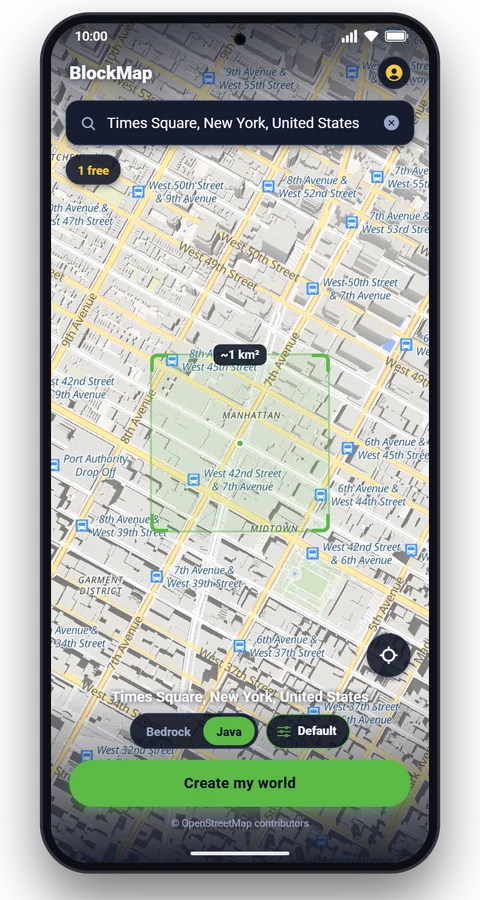
- Search the place in the app. For the stretch in our videos, search . The square on the map is the square kilometre your world will cover.
- Switch to Java on the main screen and tap Create my world. A Java Times Square world is about 25 MB.
- Open the download link on your computer. Copy it in the app or share it to yourself; it works for about 24 hours.
- Unzip it into your saves folder ( on Windows), start the Fabric profile and open the world from Singleplayer.

The app builds one square kilometre around your search, about a dozen blocks of 7th Avenue around Times Square; the tallest tower in it, the Bank of America Tower, stands 354 blocks above the street. Our 3 km world was built on our servers with the same engine. Your first world in the app is free; after that you get a free world every 8 hours, or Pro removes the wait. Places with tall towers close together work best: Midtown or the Financial District in New York, Chicago's Loop, Central in Hong Kong, Dubai Marina, Lujiazui in Shanghai, Shinjuku in Tokyo.
How the swing works
Minecraft has no ropes, so the mod does the physics itself, 20 times a second, on your computer. In short: a rope that only pulls, the game's air drag taken back, and a few rules that keep you out of the walls.
- The rope. When the web sticks, the rope gets 96% of your distance to the pivot, so it starts with a small tug. Each tick the mod checks where you would be next; if that is farther from the pivot than the rope, your speed is replaced by the speed that keeps you on the rope's circle. A rope pulls, it never pushes, and the rest is a pendulum.
- The pivot. A pendulum hung from a wall swings you into that wall at the bottom. So the line is drawn to the wall, but your body swings round a point 70% of the way from the wall's spot toward your side, 2 blocks off the face, out over the street.
- Air drag, taken back. Minecraft slows anything in the air by 9% sideways every tick, which would kill a swing in two seconds. On the web the mod takes that back and keeps gravity; after you let go, the drag is 1.5% a tick, so your speed carries.
- Steering. Each tick, 14% of your sideways motion (relative to where you look) fades, so you go where you look and a web on a side wall doesn't throw you into it.
- Reeling in. While you are below the pivot, the rope shortens by 2 blocks a second, so a long swing tightens into a faster climb. It is never shorter than 5 blocks.
- Letting go. Your speed is multiplied by 1.12 and you get 5.6 blocks a second upward. The web also lets go by itself at the top of the arc, after 8 seconds, or when you are stuck against a wall.
- Aiming at the sky. The launcher casts 66 rays up and ahead, looking for a wall 6 to 60 blocks above you, at least 8 ahead and within 25 to the side. It scores each one: the right height for how high you are, about 34 blocks ahead, about 10 to the side, the other side from your last web, not a wall square across your way. If none fits, 210 wider rays search 130 blocks out and 75 to the side.
| Value | Why | |
|---|---|---|
| Web range | 90 blocks | Crosshair shots; the wide search reaches 130 |
| Top speed on a web | 64 blocks/s | 3.2 blocks a tick; the release boost can add a little |
| Release boost | × 1.12 | Plus 5.6 blocks/s up: the jump off the web |
| Longest swing | 8 s | Then the web lets go by itself |
| Pump with W | 12.8 blocks/s² | Only below the pivot, in the direction you look |
| View at speed | up to 18% wider | From 20 to 60 blocks/s; the game's FOV Effects slider scales it |
The web itself is three lines: a thick main strand and two thin strands twisting round it, with a splat of eight short strands flat on the wall where it sticks. In third person the mod also poses the body: it hangs from the raised hand on a web, lies along the flight in the air, head first into a dive, and every second release, if it climbs, adds a front flip or a corkscrew, by turns. On the server side there is only the item and one rule: a player holding the launcher takes no fall damage.
How we filmed the trailer
Every shot in the trailer is real gameplay with this mod, in the same Midtown world, filmed in Minecraft Java with Sodium, Iris and the Complementary Reimagined shaders at golden hour. Our test bot plays: it runs off a roof, fires the webs and lets go near the top of each arc. The camera is a scripted one we built into the mod for filming. It stays off unless you start the game with a special setting, so it does nothing in your game. Every frame is rendered exactly 1/60 of a second of game time after the last one, so nothing stutters, and the slow-motion shot slows the game itself to 4 ticks a second.


If something doesn't work
| What you see | What to do |
|---|---|
| Minecraft doesn't start and names fabric-api | Fabric API is missing or for another version. Put Fabric API for 26.3 in the mods folder. |
| Fabric says Web Swing needs Minecraft 26.3 | You started another version. Pick the Fabric profile for 26.3 in the launcher. |
| The game starts, but there is no Web Launcher | Check that you started the Fabric profile, not the plain one. Look in Tools & Utilities, or search "web" in the Creative inventory. |
| /give says you don't have permission | Cheats are off. Open to LAN, Allow Cheats: ON, or make the world with commands allowed. |
| Holding right-click does nothing | Nothing to stick to is in reach. Look up at a wall ahead, more than 3 blocks above your eyes and more than 6 blocks away; in open country there is nothing to hold. If a web just let go by itself, release the button and press again. |
| You keep hitting walls | Look down the street while you swing: the swing follows your view. Let go a little earlier. |
| The Fabric installer won't open on a Mac | System Settings, Privacy & Security, Open Anyway. If it still won't, install Java first (the .jar needs it). |
Something else? Write to contact@nikandrsoftware.com with your Minecraft version, the list of your mods and, if the game crashed, the crash report.
Questions
Is this a Spider-Man mod?
No. Web Swing is our own web swinging mod: you swing between buildings the way Spider-Man does in the films, but there is no character, suit, logo or anything else from Marvel's stories in it, and your player keeps their own skin. Spider-Man is a trademark of Marvel. Web Swing and BlockMap are not affiliated with or endorsed by Marvel, Sony or Disney.
Is there a Spiderman mod for Minecraft Java 26.3?
Fan-made Spider-Man mods exist, with suits and powers from the films. Web Swing does one part of it, the web swinging, for Minecraft Java 26.3 with Fabric, free and open source. It adds no suit, character or powers beyond the web and the swing.
Can I use a Spider-Man skin with it?
Yes. Web Swing doesn't change how your player looks, so any skin works, including one you made or downloaded. The mod doesn't come with a skin.
Can you swing like Spider-Man in Minecraft without mods?
Not really. Minecraft has no ropes, and cobwebs slow you down instead of holding you. The closest moves without mods are gliding with an elytra, a Riptide trident in the rain, and wind charges to jump high. Swinging on a web needs a mod like this one.
Is Web Swing free?
Yes. The mod is free, with no ads and no account. It is open source under the MIT license: the source code is on this page.
Does it work on Bedrock, on phones or on consoles?
No. Web Swing is a Fabric mod for Minecraft Java Edition on a computer (Windows, macOS or Linux). Minecraft on phones, tablets and consoles is the Bedrock Edition, which can't load Fabric mods.
Which Minecraft versions does it support?
Minecraft Java 26.3 only (and its 26.3.x updates). It won't load on 1.21 or on the 26.4 snapshots: Fabric shows a message that asks for 26.3 instead of crashing.
Does it work with Forge or NeoForge?
No. It is a Fabric mod and needs Fabric Loader and Fabric API.
Does it work with Sodium, Iris and shaders?
Yes. The trailer on this page was filmed with Sodium 0.9.2, Iris 1.11.7 and the Complementary Reimagined shaders. The two gameplay runs were filmed without them: only Fabric API, Web Swing and our test bot.
Does it work in multiplayer?
We built and tested it in single player. On a server, the server needs the mod too, because the Web Launcher is a new item. Other players see you move, but your web and your swinging pose are drawn on your screen only. A dedicated server may kick a fast swinger for flying; set allow-flight=true in server.properties if that happens.
Can I use it in Survival?
Yes, the swing works the same and you take no fall damage while you hold the launcher. Version 1.0.0 has no crafting recipe, so take the Web Launcher from the Creative inventory or with /give. In a Survival world, turn on cheats for the session with Open to LAN, Allow Cheats: ON.
Is the download safe?
It is a 37 KB file with the source code next to it. The mod has no network code: it doesn't connect to anything. Check that your file's SHA-256 matches the one in the download table, and download it only from this page.
Can I use it in my videos or a modpack?
Yes. The MIT license lets you use, share and change it, also in videos, streams and modpacks. A link to this page is appreciated.
Do I need BlockMap to use it?
No. Web Swing works in any Java world with buildings tall enough to hold a web: your own builds, maps you download, worlds from Arnis on a computer. BlockMap is how we get real cities, and the easiest way to get one on your phone.
Versions and credits
| Version | Date | Minecraft | Changes |
|---|---|---|---|
| 1.0.0 | 4 November 2026 | Java 26.3, Fabric | First public release: the Web Launcher, the swing, aim at the sky, the third-person poses, /webswing cam. |
Web Swing is © 2026 Nikandr Software Limited, under the MIT license. Not an official Minecraft product; not approved by or associated with Mojang or Microsoft. Spider-Man is a trademark of Marvel; Web Swing and BlockMap are not affiliated with or endorsed by Marvel, Sony or Disney. Fabric Loader and Fabric API are by the FabricMC project (Apache 2.0). The trailer uses Sodium, Iris and the Complementary Reimagined shaders by EminGT; they are not part of Web Swing. Map data © OpenStreetMap contributors.
More articles
 Guide
 Guide
 How it works
Make your own place in Minecraft
Search any street, school or city. About a minute later it's a world. Your first one is free.